Networking for Dummies
 |
|||||||||||||||||||||||||||
 |
|||||||||||||||||||||||||||
|
|||||||||||||||||||||||||||
|
Chapter 3 Sharing the Internet In This Chapter
Sharing the Internet is a fantastic way to take advantage of your network. For starters, using a single Internet connection for all the computers on your network means that everyone can access the Internet at the same time without having to tie up multiple phone lines. However, the real fun begins when you share a broadband connection, such as DSL, ISDN, or a cable modem. We cover these technologies later in this chapter, but for now, the important thing is to understand that broadband is a catch-all phrase for fast Internet access. With a broadband Internet connection and a network, you can get blazing fast access to the Internet for all your computers. Figuring Out What You NeedTo use the Internet, including e-mail and Web surfing, you need a few basic elements:
Web browser software is free — Microsoft Internet Explorer comes with Windows, or you can use Internet Explorer to download Netscape Communicator (www.netscape.com). E-mail software is also included with Windows (Microsoft Outlook), or comes with Netscape Communicator, or you can purchase a program such as Eudora (www.eudora.com). As for the hardware device used to connect to an Internet service, most computers come with a standard telephone modem. And with a standard modem, you can use the built-in Windows Internet connection-sharing feature to make a modem on one computer in your network available to all the other computers in your network. Although this method works, you probably want to consider something faster, especially since the cost of the device and the service can be shared across all the computers in your network. By connecting via a hardware connection, that is, connecting your Internet device directly to your network, you gain many advantages over Windows Internet connection sharing. The next few sections lay out all the details. Sharing the Best WayYou can share an Internet connection in one of two ways:
Although both of these methods work to share an Internet connection, they have some significant differences. Your choice will affect the type of hardware you need. Sharing the Internet with the Windows Internet connection-sharing featureThe good news is that Windows 98 and later (2000, Me, and XP) include an Internet connection-sharing feature. However, while the Internet connection-sharing feature included in Windows does work, it isn’t the ideal solution for sharing the Internet for several reasons.
In addition, to obtain adequate security for your shared network connection, you would need to purchase additional firewall software to safeguard your network from tampering via the Internet. Finally, because Windows Internet connection sharing doesn’t allow something called VPN passthrough, you may have difficulty connecting to other networks. Without VPN passthrough, you may not be able to connect properly to your corporate network in order to work at home.
If you choose to go with Windows Internet connection sharing, your choice of Internet connection hardware (such as a telephone modem, DSL, or cable modem) is pretty open. The device can be internally installed in one computer, externally installed via a USB port, or connected via some other method. As long as one computer in your network can gain access to the Internet, it can then be set up as the Internet server (or host) and share its connection with the other computers in your network. Sharing the Internet with a hardware connectionFor our money, sharing the Internet via a hardware connection is the best option. Using a router that’s capable of sharing an Internet connection, such as the USRobotics Model 8000A or Model 9003 Broadband Routers, gives your network the ability to take full advantage of an always-on broadband Internet connection, such as DSL, ISDN, or a cable modem. With a hardware Internet connection, any computer on your network can connect at any time, regardless of whether any other computers are turned on and without burdening any other computers. This feature is great because it saves on electricity and on the hassle of turning on multiple computers in order to connect to the Internet.
In addition, the current line of USRobotics Broadband routers offer robust firewall protection to keep your network safe from unwanted visitors. Choosing the Right Internet Connection HardwareTo reach the Internet from your home computer, you need a hardware device that can communicate with an Internet server at your ISP. Depending on where you live, you have some choices about the type of hardware you can use. Your options may include
Each of these options has its individual pros and cons — and some options aren’t as widely available. Read on for more information that can help you determine which connection is the right one for you.
Telephone modemsA standard telephone modem works by taking computer data (digital data) and translating it into a form that the telephone line can handle (analog data). The maximum speed you can attain with a modem is 56K. In fact, today you can probably only buy 56K modems — don’t even accept a slower modem as a gift. When you use a modem to access the Internet, you dial out to your ISP, and the ISP’s servers provide you with access to the World Wide Web and e-mail. A modem is the least expensive Internet connection and dial-up access is available everywhere. Most new computers come with a 56K modem built in. It’s nothing to get too excited about — a 56K modem is really a slow connection compared to the other possibilities. Also, with a modem, you have to dial out each time you want to use the Internet, which ties up your phone line. If you want a dedicated modem line to avoid missing incoming phone calls, you have the added cost of paying for a second line. ISDNISDN stands for Integrated Services Digital Network. ISDN is basically a type of phone line that uses a digital signal instead of the traditional analog signal. ISDN connections are typically available at 128Kbps (twice that of a standard telephone modem) and make a good alternative to a standard telephone modem if you don’t want to spend a bundle.
ISDN (as with the other broadband options discussed in the following sections) is not available everywhere. Check with your local phone company or search the Web to see if ISDN service is available in your area. Often, ISDN is available in urban and semi-urban areas, but not in rural locales. If ISDN is available in your area, you can typically purchase the necessary hardware (called a terminal adapter) from the phone company or another company that offers the ISDN connection.
Cable modemsCable modems send data over your cable-television company’s line. Some cable modems are stand-alone devices that can then be connected to your network while others are internal or Universal Serial Bus (USB) devices that must be installed in one computer, which can then share the Internet connection via the Windows Internet connection-sharing feature.
One great, good thing about cable modems (and DSL devices, as we discuss in the next section) is that you’re always connected to the Internet — no need to dial out each time you want to use the Internet. (This type of connection is sometimes called an always-on connection.) Plus, cable modems download data really fast — up to 1 million bits per second (1 Mbps). In practice, you won’t likely get 1 Mbps, but the speed will still handily outpace ordinary phone modems and ISDN. Finally, you don’t have to perform any configuration chores to get your cable modem to connect to an ISP. The installation process the cable company performs hooks you up with its ISP automatically. The main downside to cable modems is that they work by connecting you to a network of other cable-modem users. So, as this network of cable-modem users grows (more people use the service in your area), each of you loses some speed because everyone is trying to use a portion of the same network bandwidth. In addition, you will almost certainly have to use your local cable company as both your cable modem service and your ISP. This can be a good thing or a bad thing, depending on the service record of your local cable company.
Digital Subscriber Line (DSL and ADSL) devicesA DSL device is like a digital modem (modems are analog) that hooks into your telephone line. DSL uses a separate frequency range (one that can handle digital transmissions) in your telephone wires so that you can continue to use your telephone for voice and fax while simultaneously connecting to the Internet. DSL devices typically connect via an Ethernet cable or a USB connection. If you’ve cabled your network with Ethernet or have a USRobotics wireless network, you can connect the DSL device directly to a USRobotics broadband router (8000A, 8011, 8022, or 9003) and make the Internet available to all the computers on your network.
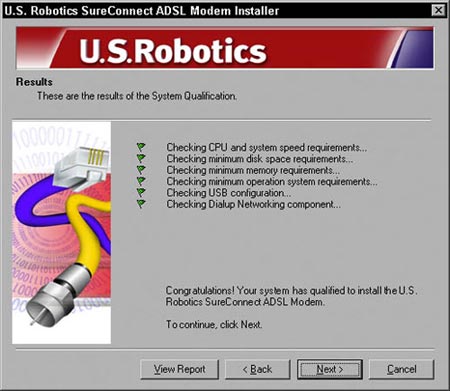
Technically, ADSL can support download speeds of 8 Mbps and upload speeds of 1.5 Mbps. That’s beyond blazing fast. But don’t get excited — in practice, ADSL runs slower than its maximum speed, but still much faster than a telephone modem. DSL devices have several advantages over other devices. They don’t tie up your phone line (you can use your telephone and fax at the same time as DSL). Also, like a cable modem, DSL provides an always-on connection with the Internet, and unlike a cable modem, with DSL, your connection is private — you’re not competing for part of a shared network with other users. Setting up your DSL connection is easy and is performed in one of two ways. Either a technician from your DSL service provider will visit you and install and configure your connection, or you can use a software program such as SureConnect, shown in Figure 3-2.
The downside to DSL is that (just like sports cars), fast speeds command high prices — the higher the speed you want, the higher the monthly fee. Also, the service must be available for the physical location of your home. Before you can rush to order DSL services, your telephone company must provide the technology that DSL requires, and you must live within about 3.5 miles (5.5 km) of a telephone company central switching office (CO), or local telephone exchange as its known in Europe. You don’t have to get out your tape measure and walk from your house to the CO — any DSL service provider can tell you if you qualify. Before you sign up with a DSL provider, do some research on the Web, read the fine print, and make sure that the company you’re considering has a good repair record if things go awry. |